
 AcmefyerAgent-based Certificate Manager
SSL certificates that renew themselves.
Acmefyer is an SSL certificate manager for your own network: it obtains SSL/TLS certificates from Let’s Encrypt, ZeroSSL or Google Trust Services, issues its own from a local CA for internal names, renews them in time and rolls them out wherever they are needed. Certificates from an existing internal CA, or the CA itself, come in by import. Installation happens from the inside: an agent on the target system picks up the certificate itself, without PowerShell remoting and without inbound ports.
One certificate, many services: Acmefyer renews it and the agents install it everywhere.
SSL certificate lifetimes are shrinking to 47 days.
The browser vendors Apple, Google, Microsoft and Mozilla and the certificate authorities decided in the CA/Browser Forum to shorten the lifetime of public TLS certificates step by step: from 398 days to 47 days by 2029. Domain validation can then be reused for only 10 days.
At 47 days, every certificate is replaced roughly once a month, on every web server, every mail system and every firewall. That can no longer be done by hand. Acmefyer renews automatically and installs the new certificate via the agent, with no one having to step in.
Source: CA/Browser Forum, Ballot SC-081v3, approved on 11 April 2025.
Every ACME challenge, wildcards too
HTTP-01 with a built-in challenge server, DNS-01 for around 190 DNS providers, including wildcard certificates (*.example.com), and TLS-ALPN-01.
Automatic certificate renewal
Scheduling with backoff, a lock per certificate and idempotency. Nothing runs twice, nothing expires.
Rollout via agent
The agent on the target system picks up the certificate itself and installs it locally, without inbound ports.
Secure by default
AES-256-GCM for secrets, Argon2id passwords, AD/LDAP sign-in with roles, optional TOTP and an audit log.
Notifications
Email, Teams, Telegram, PRTG or webhook. With templates, rate limiting and deduplication.
Two interfaces, one core
Web interface in the browser, in German and English, light and dark. Plus a terminal interface right on the server.
Certificates of your own and a local CA
Import certificates from an internal CA, self-signed or purchased ones (PEM, DER, PFX) and deploy them through the same agents and targets. For internal names such as server.company.local Acmefyer creates and manages one or more internal CAs of your own if you wish: a root CA with a name constraint, intermediate CAs per purpose (TLS server and client, S/MIME, code signing) and certificates that Acmefyer renews with a new key and rolls out again by itself. Acmefyer can also take over an existing root or intermediate CA, for example from XCA, OpenSSL or AD CS, together with its key, and your systems then trust it already. Certificates it issued before come in several at once: they appear in the tree below their CA, and from then on Acmefyer renews the server certificates. Certificates of your own CA can be revoked: each CA signs a revocation list (CRL), which the server serves over HTTP and signs anew in good time. If you wish, Acmefyer revokes a replaced certificate once the new one has reached every target. The target “Trust store (CA)” makes your own CA trusted on Windows and Linux agents.
Acmefyer is under continuous development: updates keep adding new features and supported services.
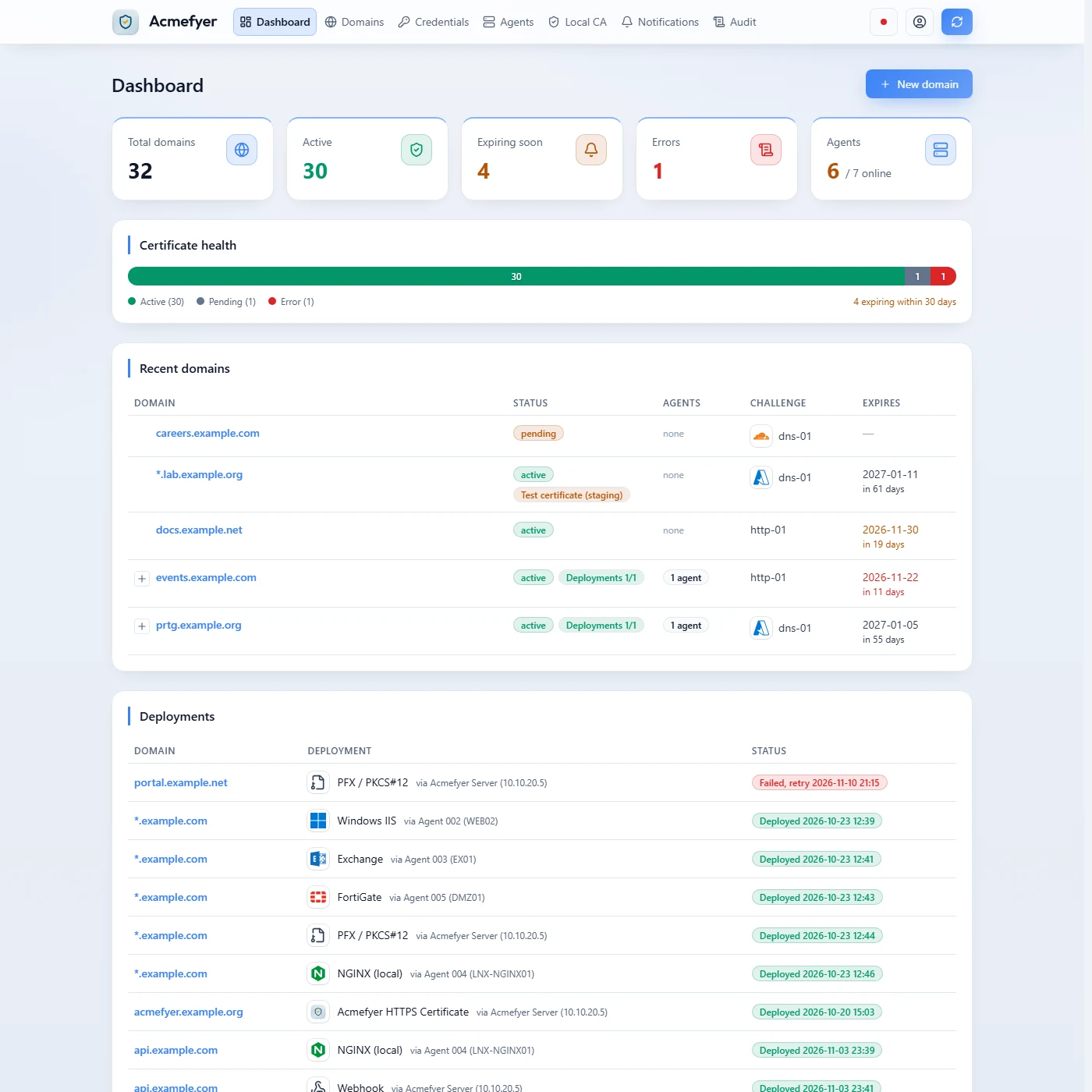
At a glance: how many certificates are valid, which expire soon, where an error is pending and which agents are online.
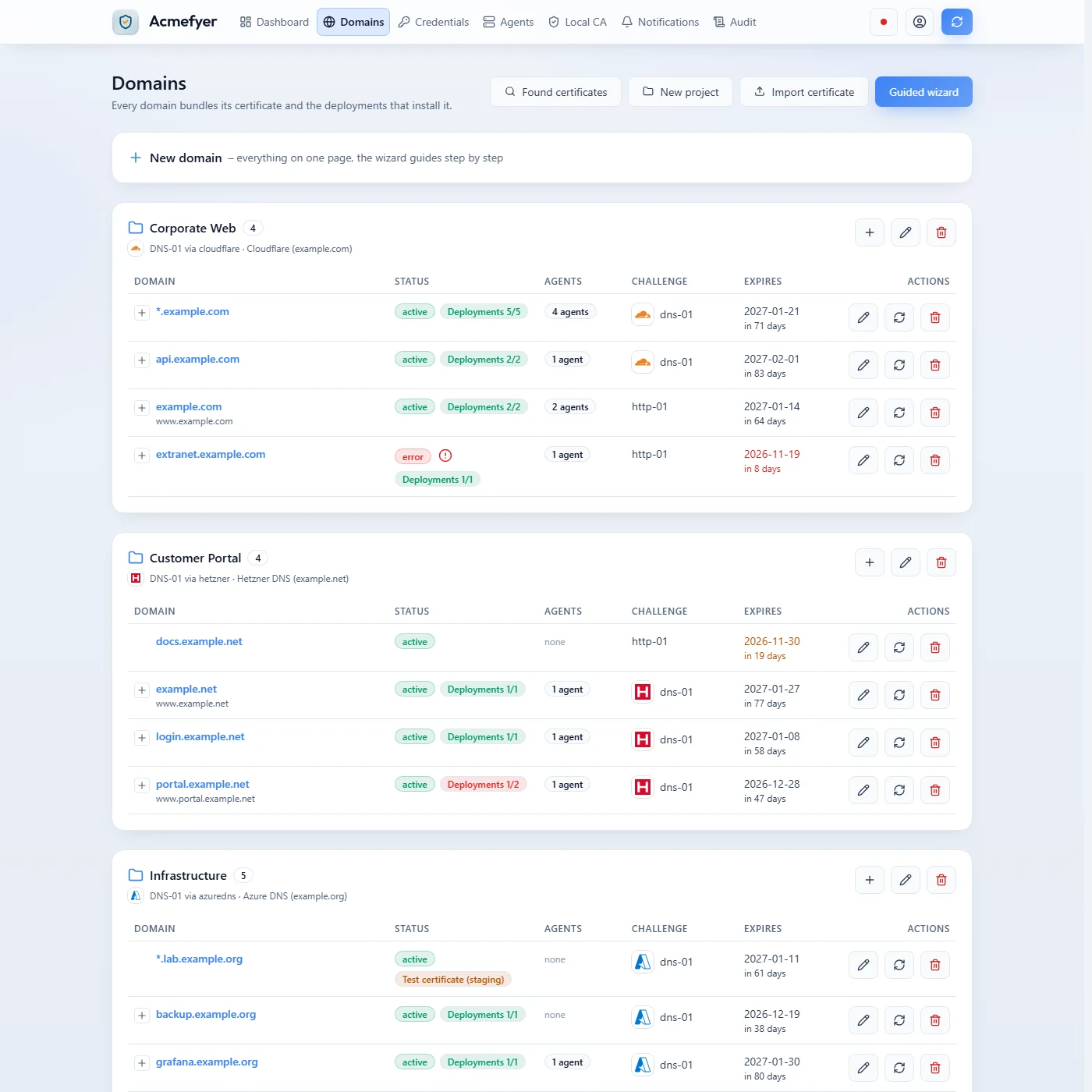
Domains in projects, with status, deployments, challenge and expiry. What expires soon or is stuck is marked in red.
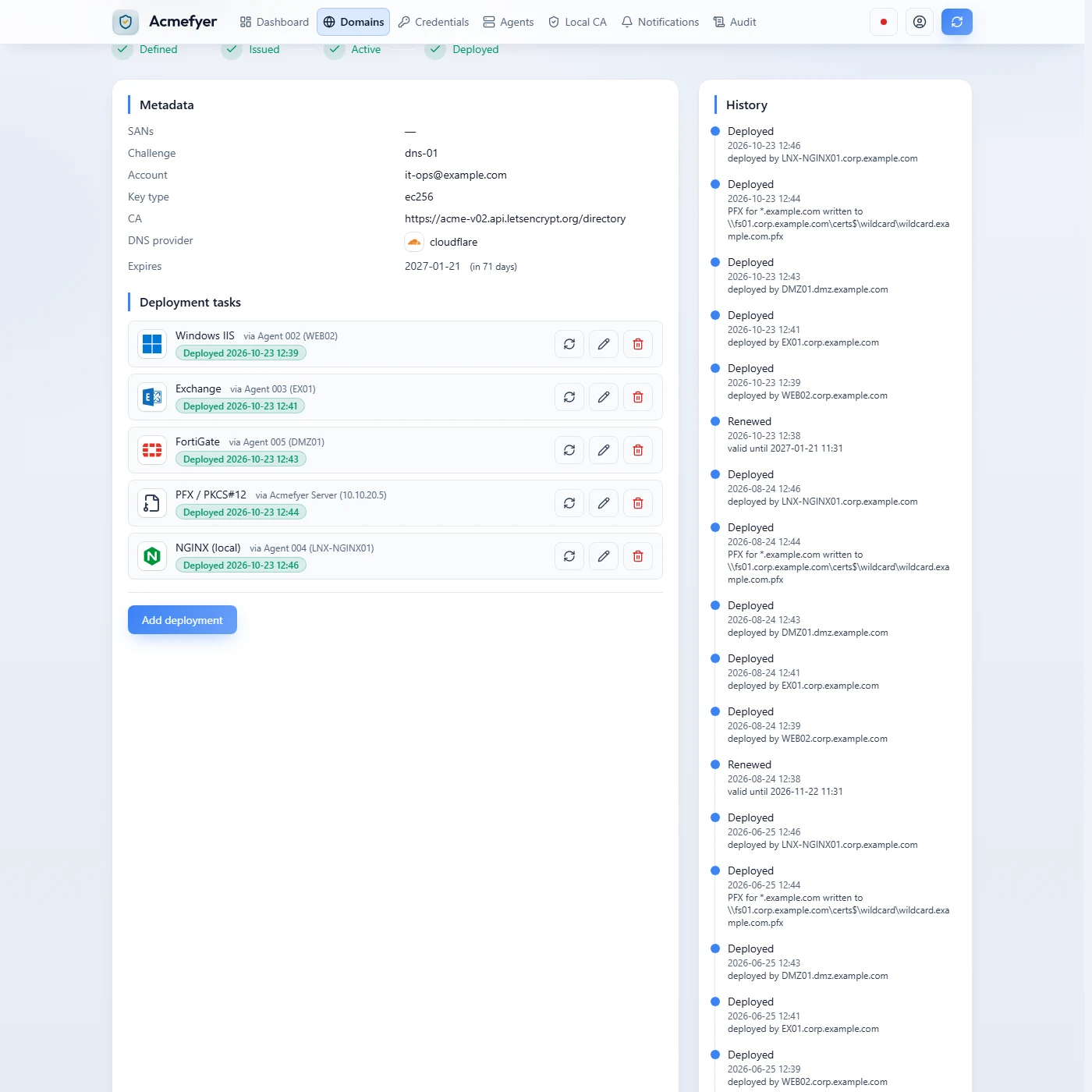
One domain and its targets: through the agents the certificate goes to IIS, Exchange, FortiGate and NGINX, each with the result of its last run.
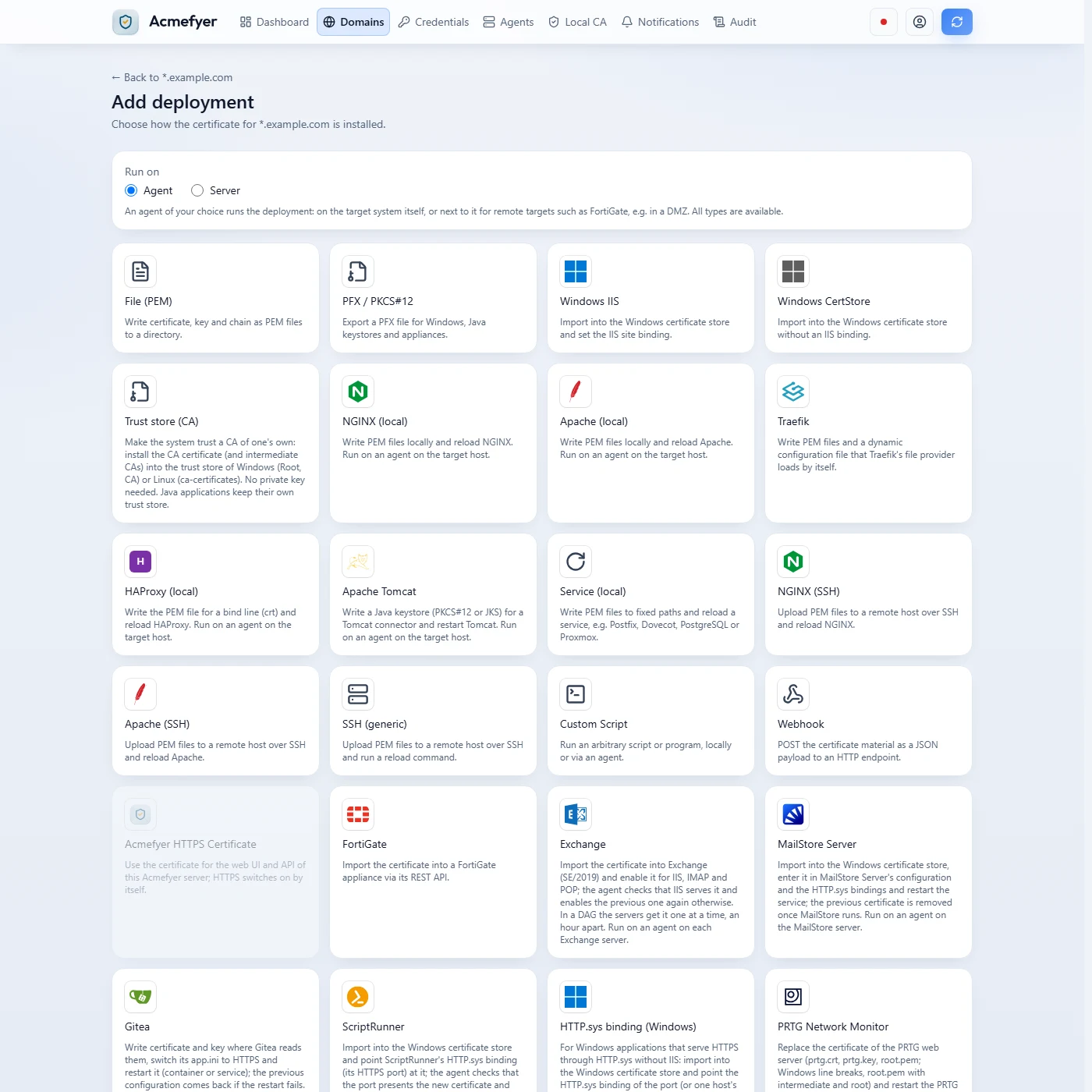
Choosing a new target: from a PEM folder via IIS and Exchange to NGINX, Traefik, Tomcat and appliances, run on the agent or the server.
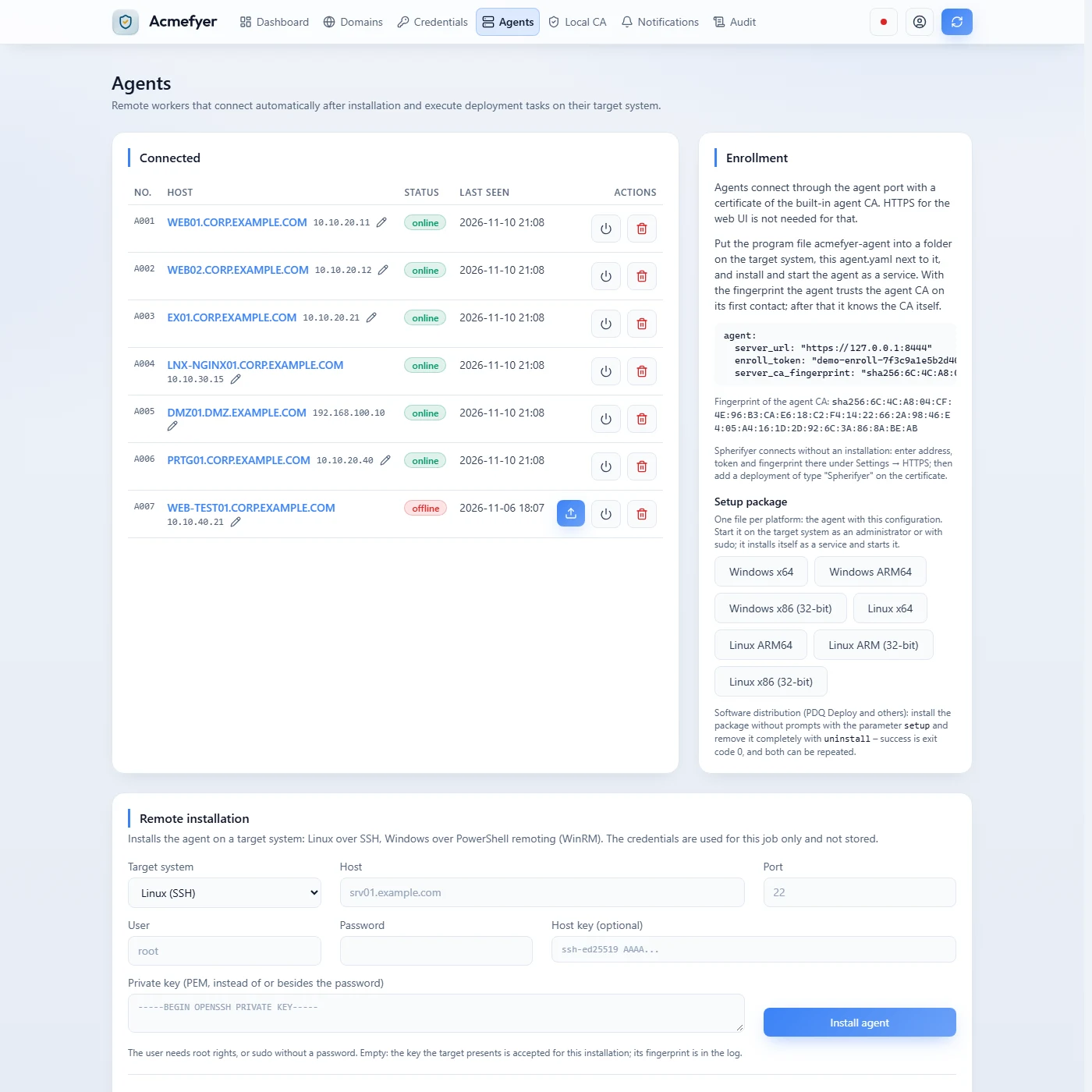
The agents with status and last contact. New agents join through a setup package per platform that installs itself as a service.
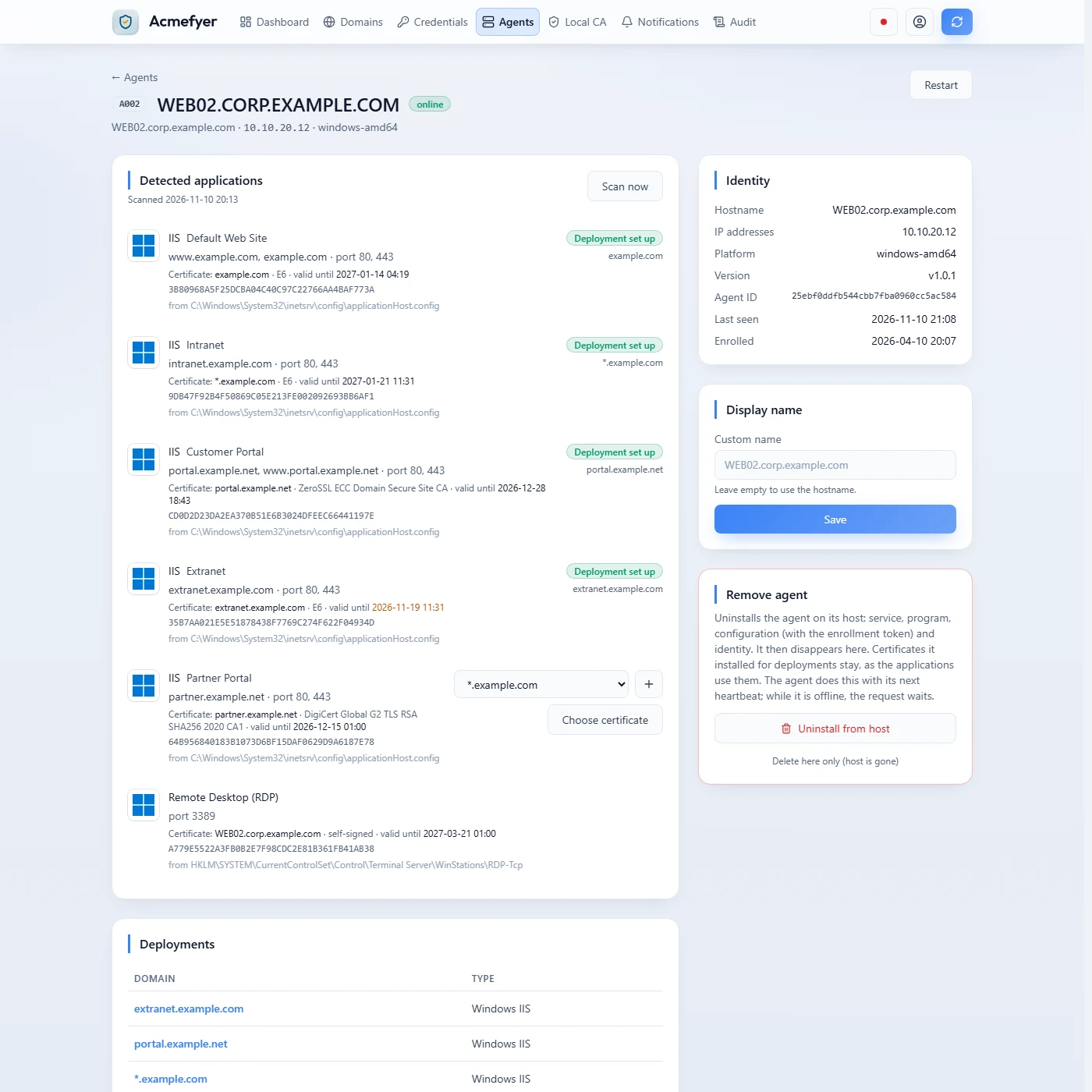
The agent finds on its own what speaks TLS on its server, with names, ports and the certificate currently in place.
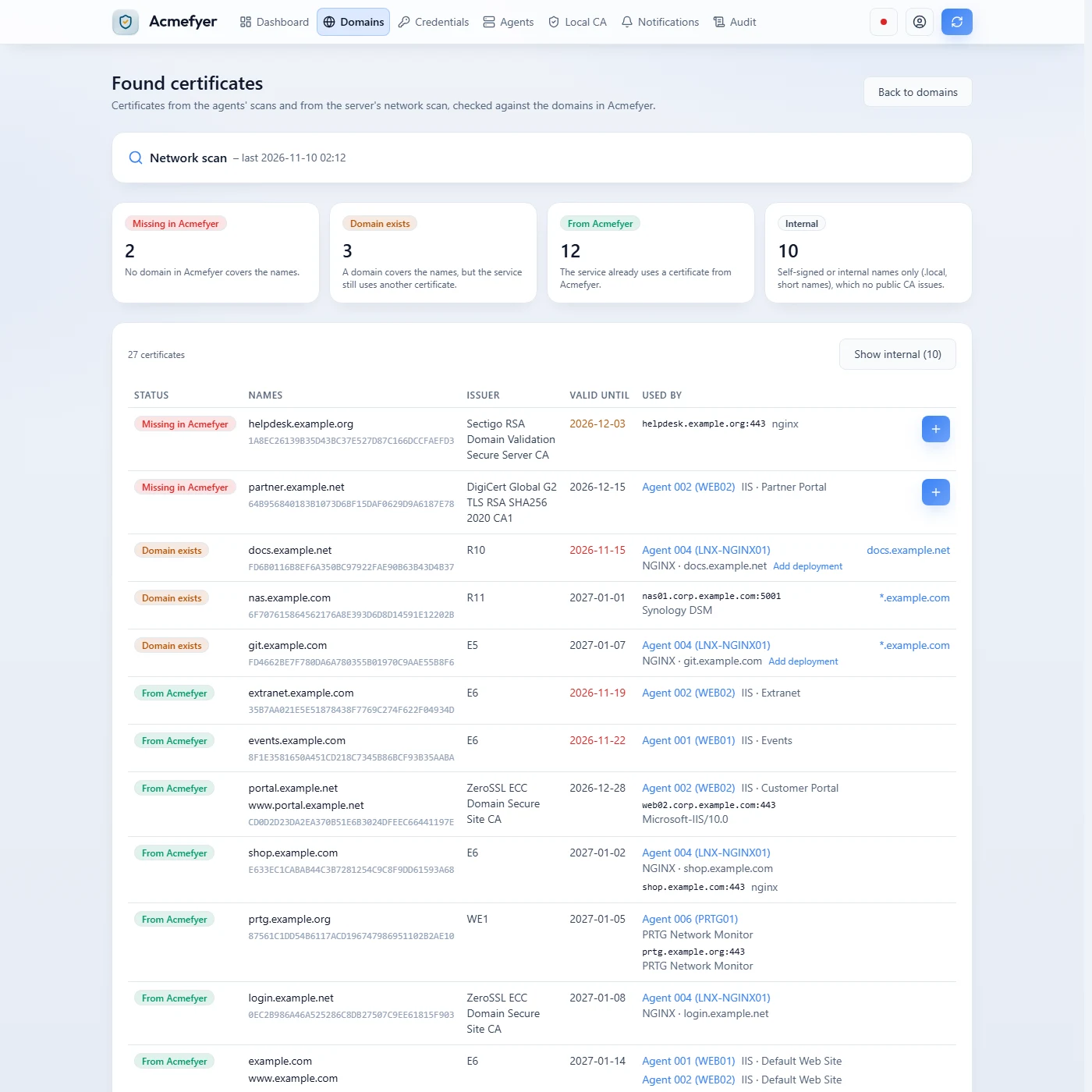
All certificates in the network, from the agents' scans and a network scan: what Acmefyer does not manage yet is at the top.
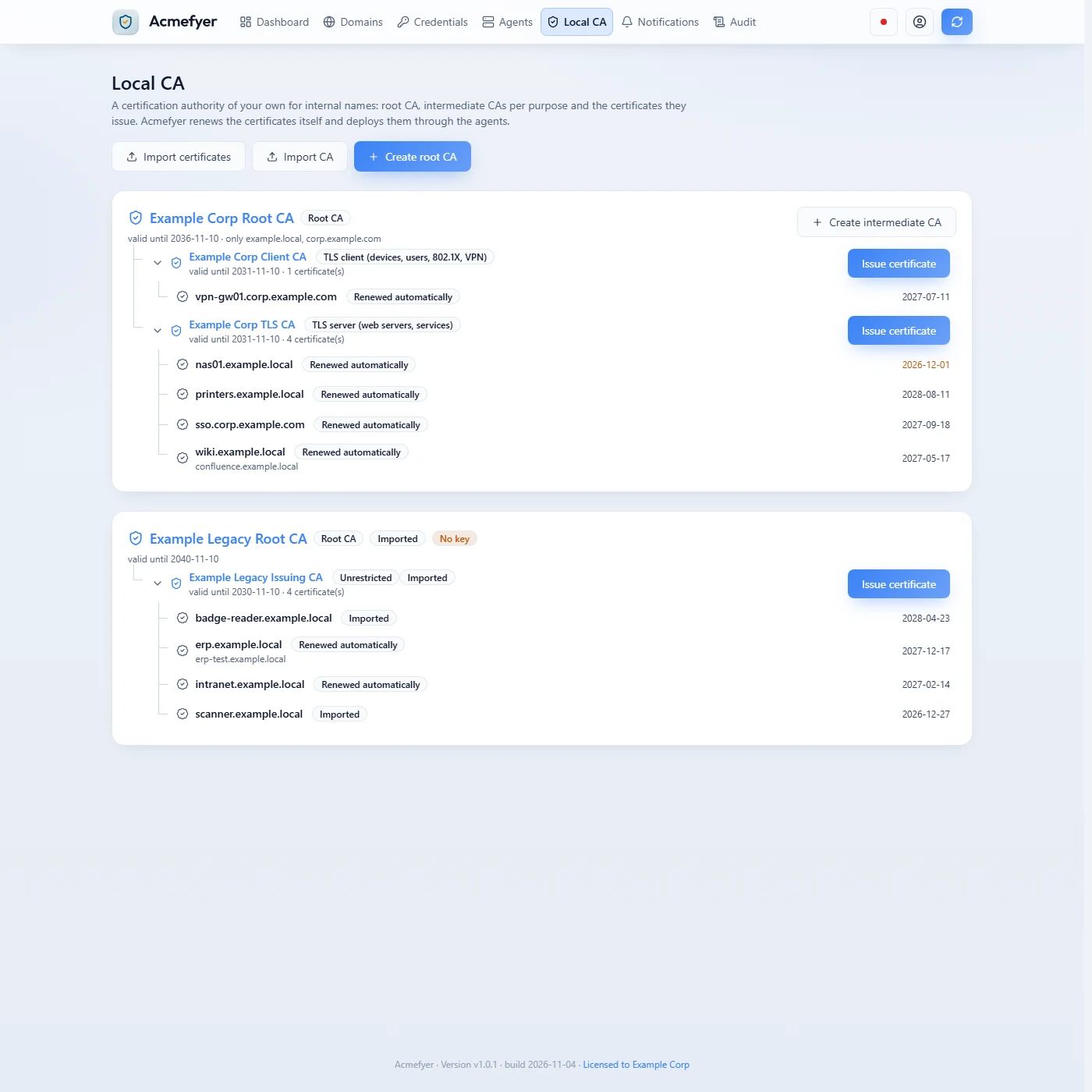
The CA of your own for internal names: created new or taken over with its certificates, and Acmefyer renews them itself.
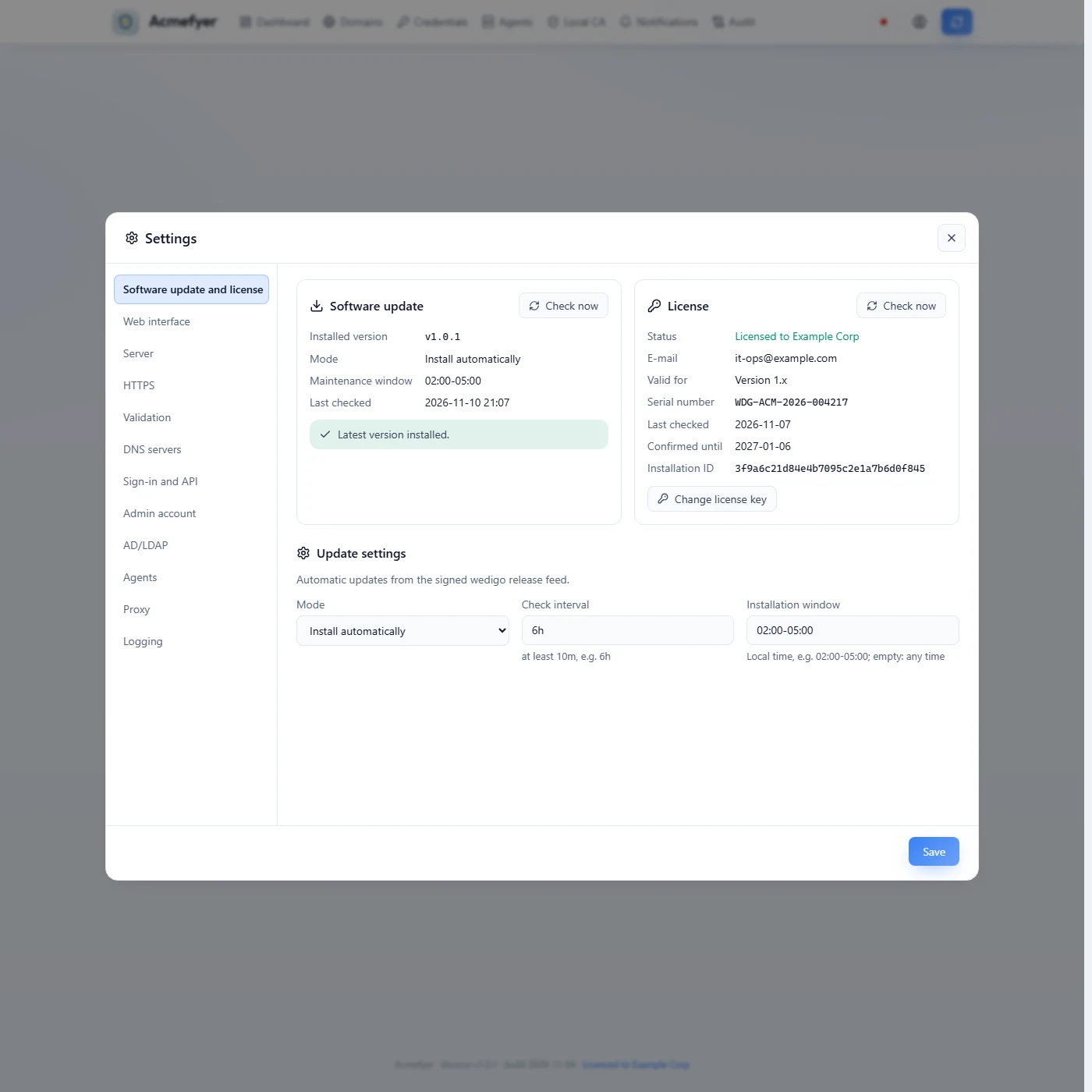
Everything configurable in the browser: updates, license, HTTPS, sign-in with AD/LDAP and two-factor, agents and proxy.
Deploy certificates via agent: no holes in the firewall, no PowerShell remoting.
Many tools and scripts push certificates from the outside: via PowerShell remoting, file shares or remote logins. That requires open ports on every target system and administrator credentials stored in one central place.
The Acmefyer agent runs directly on the target system. It opens an encrypted connection to the Acmefyer server itself, picks up the certificate and installs it locally.
This is how certificates get into IIS and other HTTP.sys applications, Exchange, MailStore Server, PRTG, ScriptRunner, the Windows certificate store, NGINX, Apache, Traefik, HAProxy, Tomcat, Gitea, any service that reads PEM files, or custom scripts. In addition, Acmefyer exports PEM and PFX files to the file system or a Windows share, transfers them via SSH, calls webhooks and installs certificates on firewall appliances via REST API, e.g. FortiGate.
For each target you choose who performs the rollout: the server itself or an agent. The server only offers the safe actions, namely export, SSH and webhook. Firewall appliances such as a FortiGate are always served by an agent, for example one in the DMZ right next to the firewall.
- Connection
- Outbound only, from the agent to the server, via HTTPS with mutual certificate verification (mTLS). No inbound port is needed on the target systems.
- Firewall
- One rule: agent to the server on port 443 when the web UI has HTTPS with a publicly trusted certificate, otherwise to the agent port (default 8444). No WinRM, no file share, no RDP.
- Credentials
- The server stores no administrator passwords for the target systems. The agent works with the rights of its local service.
- Installed locally
- IIS bindings, HTTP.sys bindings, Exchange, MailStore Server, PRTG Network Monitor, ScriptRunner, Gitea, Windows certificate store, Windows and Linux trust stores (your own CA), NGINX, Apache, Traefik (also in a container), HAProxy, Tomcat keystores (PKCS#12/JKS), services such as Postfix or PostgreSQL, custom scripts and the web interface of Spherifyer (connects itself, no agent)
- Internal networks
- Target systems need no internet access. Only the Acmefyer server talks to the certificate authority.
- Detection
- The agent finds the applications serving TLS on its system, such as NGINX and Apache sites, Traefik also in Docker containers, HAProxy, IIS, Exchange, MailStore Server, PRTG, ScriptRunner, Keycloak, the enaio gateway, Gitea in a container, mail and database servers or Proxmox, with certificate file and expiry. On Windows also Tomcat, Apache and NGINX bundled by vendors, and every other port that speaks TLS, with the program behind it. Where one fits a certificate, the deployment is one click away. If certbot, acme.sh or a container renews the certificate already, the scan says so. Reverse proxies with many sites are set up in one step, missing domains included: sites sharing a certificate file get one certificate for all their names, and after a renewal the proxy reloads only once. An overview lists every certificate found and which of them Acmefyer does not manage yet. The server can also scan your own network for them read-only, with no agent at all.
- Setup
- The server generates a setup package per platform (Windows and Linux, x64, ARM64 and 32-bit) with the configuration built in. Or it installs the agent once itself: on Linux via SSH, on Windows via PowerShell remoting, detecting the target's processor. Likewise an agent can be uninstalled from the server without leftovers: service, program, configuration and identity. For PDQ Deploy and other software distribution the package installs itself with the parameter setup and removes itself with uninstall, without prompts and with an exit code.
The server obtains the certificate over the internet. The agents on the target systems open a connection to the server themselves and install it locally. Nothing is opened from the outside.
For firewall appliances such as a FortiGate, an agent in the DMZ performs the rollout. Only its outbound connection to the server passes through the firewall, and the server itself needs no path into the DMZ.
A script server accesses every target from the outside: each target system must keep several ports open for its connections. With Acmefyer there is exactly one inbound connection, from the agents to the Acmefyer server on port 443 (with HTTPS, otherwise on the agent port 8444). The target systems need no open port.
Certificate rollout: easy to use, usually fully automated from the first step.
Acmefyer takes the legwork off your hands: the agent finds out by itself which applications on a server deliver certificates and where their files are, and Acmefyer suggests the matching deployment. In most environments this automates the certificate rollout 100 % from the first step: issue, install, verify and renew in time, with nobody having to lend a hand afterwards.
- 01
Install the agent
Run the setup package or install it from the server. The agent detects the applications serving TLS on its system.
- 02
Accept the suggestions
One click per application, whole proxy servers with all their sites in one step. Missing domains are added along the way.
- 03
Issue and roll out
Acmefyer obtains the certificate, the agents install it and check that it is served.
- 04
Renew
In the renewal window everything repeats automatically, with notification.
How far this goes the first time naturally depends on your infrastructure and the applications in place. What Acmefyer knows, such as IIS, Exchange, NGINX, Apache, Traefik, HAProxy or Tomcat, it sets up with one click after the scan. A FortiGate needs API access once, software of your own a script or the generic service deployment. And if certbot or another tool renews a certificate already, it is switched off first. The scan points this out.
Renew the Exchange certificate automatically
Import, enable for IIS, IMAP and POP, verify and roll back if needed. In a DAG one server at a time.
Read the guideRenew and bind the IIS certificate
Let’s Encrypt for IIS: import into the Windows certificate store and bind to the site, without remote access.
Read the guideWildcard certificate with Let’s Encrypt
*.example.com via DNS-01 for around 190 DNS providers: issued once, installed on every server.
Read the guideRenew free SSL certificates automatically
Let’s Encrypt, ZeroSSL and Google Trust Services issue for free via ACME. Acmefyer takes care of the rest.
Read the guideLet’s Encrypt for internal servers
Via DNS-01 without an open port 80. The internal servers need neither inbound ports nor internet access.
Read the guide47-day certificates: dates and consequences
200 days since 2026, 100 days from 2027, 47 days from 2029. What was decided and how the replacement runs by itself.
Read the guideRenew the FortiGate certificate automatically
Import via REST API and switch SSL VPN, admin interface, authentication portal and VIPs.
Read the guideNGINX and Apache on Linux
One agent per Linux server writes the PEM files and reloads the web server, for all sites of a reverse proxy in one step.
Read the guideTomcat certificate with its keystore
Write the Java keystore as PKCS#12 or JKS, with the connector’s password and alias, and restart Tomcat.
Read the guideRenew the PRTG certificate
Write prtg.crt, prtg.key and root.pem the way PRTG requires them, restart the core server, roll back on errors.
Read the guideRenew the MailStore certificate
Enter it in MailStore Server, restart the service and verify. If MailStore does not start, the agent undoes everything.
Read the guideFind expiring certificates in your network
Agent scan and network scan show every certificate with issuer, expiry date and every place it was found.
Read the guidePrivate CA with revocation list
Issue, renew and deploy certificates for server.company.local and revoke them through a revocation list (CRL).
Read the guide- Platforms
- Windows (setup or executable) and Linux, as an executable and as a .deb and .rpm package
- Programs
acmefyer-serverfor the service, web and terminal interface ·acmefyer-agentfor the target systems- Data storage
- Embedded database, secrets encrypted with AES-256-GCM
- Sign-in
- Local admin (password set in the first-time setup in the browser on Windows, initial password on Linux), AD/LDAP with roles by group or OU, optional TOTP
- Default address
127.0.0.1:443, freely configurable- Network
- Server: outbound to the certificate authority (and, for DNS-01, to the DNS provider), and to www.wedigo.net for license activation, also through a proxy (taken over from the Windows settings or set in the web interface and the console). With revocation lists of the local CA also inbound over HTTP (port 80 by default) for the clients in your own network. Agents: outbound to the server only.
- Updates
- Automatic self-update from signed releases, optionally within a maintenance window. If a new version does not start cleanly, the service returns to the previous version on its own. Can be switched off or set to notify only.
Certificate management between an ACME client and an enterprise platform.
There are roughly four ways to manage SSL certificates: an ACME client on every server, custom scripts with remote access, a certificate lifecycle management platform, or monitoring that warns before expiry.
Acmefyer combines the central certificate management of a platform with the simple operation of an ACME client: one server for all certificates, agents on the target systems, bought once.
- ACME client per server
- For example Certbot, win-acme, Certify The Web or Posh-ACME. They renew certificates on the server they are installed on. Acmefyer manages all certificates in one place and rolls them out via agent to many systems, with shared notifications and an audit log.
- Custom scripts
- PowerShell via WinRM or file shares, Certbot hooks via SSH. That requires open ports on the target systems and administrator passwords on the script server. With Acmefyer the agents connect outbound only, see Rollout.
- Certificate lifecycle management platforms
- For example Venafi (CyberArk), Keyfactor, AppViewX or Sectigo Certificate Manager, with features for private PKI, many certificate authorities and company-wide policies. Acmefyer focuses on certificates via ACME, also takes over imported certificates and brings a simple local CA for internal names, runs as a single program on Windows and Linux and is bought once.
- Expiry monitoring
- For example certificate checks in PRTG, Zabbix or Nagios. They warn before expiry, but a person still has to replace the certificate. Acmefyer renews and replaces the certificate itself and reports the result, also to PRTG if you like.
Acmefyer
- Unlimited certificates, domains and agents
- 3 years of updates, fixes and support included, new major versions too
- Then €99 per year if you like. Without an extension every version released until then stays usable without end
- Continuous development: updates keep adding new features and supported services
- License key by email right away, activated online
- 14-day money-back guarantee
- Free for non-profit and volunteer associations and institutions: full license with 3 years of updates, on request with proof through the contact form, extended free of charge
- Try it free without a key: 1 domain with 1 subdomain (or wildcard) and 1 agent, all features except the internal CA
SHA-256 checksums
Windows setup: d0bebe4802652c369d15f2747bca77f84ed700601445d6dba9f35cccd01223bc
Windows program file: a68f109dab38582b6ca12364776d7688a8a79cc8cf69cb5ed3536455396567d6
Linux: 35e69b32c73bf78e19e2b02bb35407597bb452b4a586c053fadd1d19da219b91